Views: 0 Author: Site Editor Publish Time: 2026-07-08 Origin: Site
Transitioning from outsourced marking or entry-level tools to a professional laser system requires navigating complex technical specifications. It also demands a significant capital investment. You must get the details right to ensure profitable production. At the decision stage, the focus shifts away from basic capabilities. You must prioritize production speed and verifiable precision instead. If you misjudge these critical metrics, you risk workflow bottlenecks and inconsistent output quality.
This guide establishes a technical evaluation framework for your next purchase. We help production managers and shop owners match machine specifications to exact operational requirements. You will learn how to balance power, form factor, and compliance to make the best choice. This ensures your facility runs smoothly and efficiently.
Power Dictates Application: 20W–30W units suit surface marking and annealing, while 50W+ units are required for efficient deep metal engraving.
Source Technology Matters: MOPA fiber lasers offer variable pulse widths for color marking and high-contrast plastics, whereas standard Q-Switched lasers are cost-effective workhorses for bare metal.
Form Factor Alignment: Selection between a desktop laser marker, an enclosed standalone unit, or an OEM module depends entirely on existing floor space and automation needs.
Safety & Compliance: True industrial setups require Class 1 enclosures and dedicated fume extraction to meet workplace safety standards.
Throughput vs. Cycle Time: To maintain production profitability, you must calculate the exact seconds-per-part required. A fast machine keeps your assembly line moving smoothly. If you process thousands of parts daily, saving two seconds per cycle makes a massive difference over a month. You need to identify how long the laser takes to complete its pass. We recommend testing your vector files to establish a baseline cycle time. Complex logos take longer than simple serial numbers. Hatching density also affects speed. You must balance aesthetic quality against production speed.
Marking vs. Deep Engraving: You must clearly define the required outcome before purchasing equipment. Surface annealing creates a color change without material removal. It relies on concentrated heat to oxidize the metal surface smoothly. Medical tools often require this smooth finish to prevent bacterial growth. Deep engraving physically removes material layer by layer. It creates a tactile depth you can actually feel. Gun manufacturers use deep engraving to meet strict legal regulations. These two distinct processes demand completely different power settings.
Regulatory Compliance Marks: Many industries enforce strict part traceability rules. Aerospace and medical sectors require high-resolution Datamatrix codes. You must ensure the equipment handles Unique Device Identification (UDI) tracking effectively. These serial numbers must survive harsh post-processing environments. A professional fiber laser marking machine creates permanent marks. They withstand passivation, sterilization, and aggressive chemical cleaning perfectly.
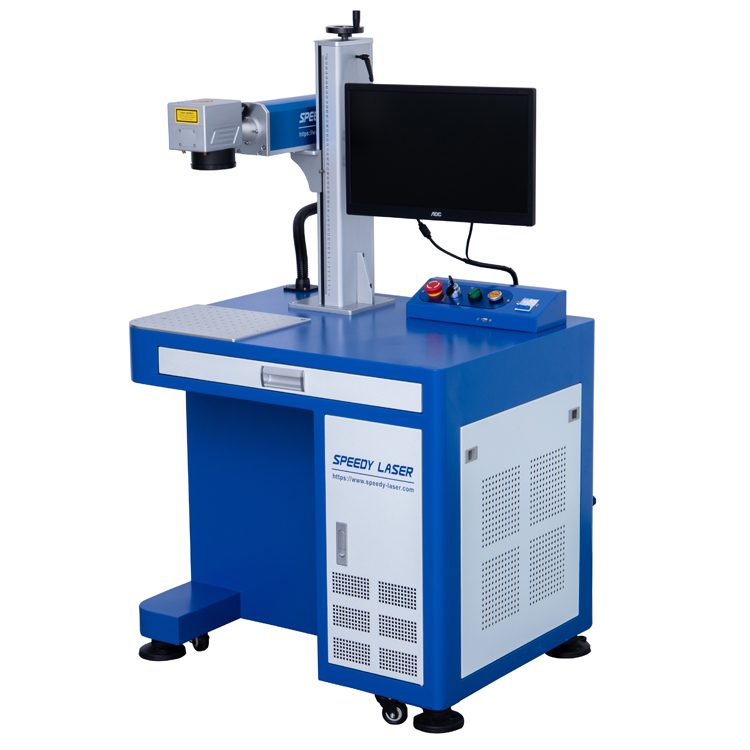
Choosing the physical design of your equipment depends heavily on your workspace environment. You must match the form factor to your daily workflow and safety protocols.
Desktop Laser Marker Systems: We often see these compact units inside jewelry shops and specialized R&D labs. Small-batch customizers love them for their versatility. A desktop laser marker boasts a smaller footprint overall. It generally offers a lower initial cost for startups. However, it comes with specific operational constraints. You are strictly limited by part size. The Z-axis height usually maxes out around eight inches. Operators must load each item manually. This slows down large-scale batch processing significantly.
Industrial Fiber Laser Marker Workstations: High-volume machine shops need something much stronger. Dedicated manufacturing floors rely heavily on these robust standalone units. An industrial fiber laser marker features an integrated Class 1 safety enclosure. It usually includes an automated Z-axis focus system for rapid setup. The heavy-duty build withstands continuous 24/7 operation. However, it requires significant floor space. You must plan your facility layout carefully to accommodate the larger footprint and necessary ventilation lines.
OEM Fiber Laser Modules: Sometimes you need to add marking capabilities to an existing conveyor line. You can integrate an OEM fiber laser directly into automated systems. High-speed assembly lines benefit greatly from this modular approach. They remain highly scalable and programmable via external PLC controllers. Keep in mind they require specialized engineering. You will need an automation technician to handle the installation, alignment, and software handshakes.
Wattage directly determines how fast and how deep you can cut into raw material.
20W – 30W: This power range serves as the optimal choice for high-contrast marks. It works perfectly on hand tools, dog tags, and medical instruments. We find it excels at surface annealing. It operates efficiently without warping thin substrates.
50W – 60W: Consider this the gold standard for deep metal applications. You need this specific power level for firearms compliance marking. It also handles deep stamping dies efficiently. A professional metal engraving machine in this tier removes material rapidly. It reduces a five-minute cycle down to thirty seconds.
100W+: Facilities reserve this extreme level for high-speed, heavy-duty industrial material removal. It also handles specific metal cutting applications cleanly. Do not buy this unless you require extreme speed for mass production.
Q-Switched lasers feature a fixed pulse width. They operate as reliable workhorses. They are highly cost-effective for standard bare metal tasks. If you only need basic serialization, Q-Switched works perfectly.
MOPA (Master Oscillator Power Amplifier) technology provides adjustable pulse durations. It is essential for high-contrast marking on anodized aluminum. You need MOPA to achieve dark black marking on stainless steel. It also processes sensitive plastics without melting them.
F-Theta Lenses: The lens size dictates your physical working area entirely. A 110x110mm lens concentrates the beam tightly into a small spot. It provides maximum energy density for deep cuts. A 300x300mm lens offers a much larger canvas for big signs. However, larger areas decrease the overall beam intensity significantly. The laser spot stretches as it reaches the outer corners. You must balance your required engraving area size against your necessary cutting power.
Galvanometer Speed: Inside the laser head, small motorized mirrors direct the beam. High-speed galvo heads matter immensely for overall output. They reduce cycle times on complex vectorized graphics. They also handle heavy hatching patterns without slowing down your production line. Quality galvos prevent distorted corners on text.
Ferrous & Non-Ferrous Metals: You can trust this technology across various metals. We see verified performance on stainless steel and carbon steel. It handles brass, copper, and titanium beautifully. Different metals simply require distinct frequency and speed settings.
Coated Metals: The beam eradicates powder coats effortlessly. It removes anodized layers and paint to reveal bare metal. You achieve high precision without damaging the substrate beneath.
Limitations (Transparency & Trust): We must acknowledge physical boundaries. A 1064nm light source is generally ineffective for organic materials. You will not see good results on wood, clear glass, or leather. The beam passes right through transparent objects. It burns wood unevenly. You require a CO2 system for those specific materials.
Material Category | Common Examples | Recommended Technology | Expected Output Result |
|---|---|---|---|
Ferrous Metals | Stainless Steel, Carbon Steel | Fiber (Q-Switched or MOPA) | High-contrast black, white, or deep engraved marks. |
Non-Ferrous Metals | Brass, Copper, Aluminum | Fiber (MOPA preferred) | Sharp surface etching, dark marks on anodized layers. |
Coated Metals | Powder Coated Steel, Painted Brass | Fiber (Any wattage) | Clean ablation revealing the bare metal underneath. |
Organic Materials | Wood, Leather, Clear Glass | CO2 Laser System | Not recommended for 1064nm. Requires 10600nm CO2. |
Deploying new manufacturing equipment involves several critical steps. You must prepare your facility properly before the crate arrives. We recommend following a structured rollout plan.
Evaluate the Software Ecosystem: You must assess the control software carefully. EZCAD2 and EZCAD3 remain the dominant standard interfaces globally. They offer deep parametric control. LightBurn compatibility makes operator training much easier for beginners. Ensure your system supports common .AI, .DXF, and .SVG file formats seamlessly.
Upgrade Safety Infrastructure: Workplace safety remains an absolute non-negotiable factor. You need OD6+ laser safety glasses immediately upon unboxing. Understand the strict differences between Class 1 and Class 4 enclosures. Class 1 setups feature robust interlocking safety doors. These doors automatically kill the beam if opened.
Install Proper Fume Extraction: Budget generously for specialized air filtration systems. Vaporizing metal creates highly toxic dust particles. It also produces dangerous chemical off-gassing from certain alloys. You need dedicated HEPA and activated carbon filtration systems. They protect your staff and keep your optics clean.
Assess Rotary Attachments: Determine your actual need for marking cylindrical parts. Chuck rotaries hold items securely from the inside out. Roller rotaries spin the object gently during processing. You must use these attachments for custom tumblers, pipes, and rings.
Requesting Sample Marks: Buyers should always send their actual production materials to the manufacturers. Ask for comprehensive sample testing before you finalize any purchase. This crucial step provides undeniable cycle-time verification. It ensures the machine meets your precise depth requirements exactly. Do not rely solely on generic metal business cards. You need proof the beam interacts well with your specific alloy.
Vendor Support & Warranty: Evaluate domestic support availability meticulously. Check their replacement parts inventory. Assess the laser source lifespan carefully. You should expect a 100,000-hour Mean Time Between Failures (MTBF) from reputable diode brands. Strong warranty terms protect your operational continuity. Look for companies offering remote login support. They can troubleshoot software issues instantly.
Calculating ROI and Operational Efficiency: Factoring in upfront costs helps clarify your budget constraints. Solid-state equipment boasts incredibly minimal consumable requirements. You must track electricity draw accurately over long shifts. Estimate potential downtime for routine maintenance. Evaluate how quickly the machine pays for itself through increased throughput. You avoid costly maintenance contracts typically associated with older technologies.
Align your wattage directly with your specific material depth requirements.
Match the equipment form factor strictly to your available floor space.
Always demand verifiable application testing on your own materials.
Prioritize trusted suppliers who offer robust technical support and training.
Avoid purely price-driven decisions to ensure long-term reliability and safe operation.
A: A 30W unit excels at fast surface etching and annealing. It creates bright or dark marks without removing much material. A 50W unit delivers higher energy per pulse. It pushes through hard metals faster. You need 50W or higher for efficient deep engraving.
A: Yes, but it requires patience. A lower-power desktop unit must run multiple passes to achieve noticeable depth. This drastically increases cycle times. If you need deep marks quickly, upgrade to a higher-wattage industrial setup.
A: Standard Q-switched units handle basic etching, serializing, and deep cutting on bare metals perfectly. MOPA units offer adjustable pulse durations. You need MOPA if you want color marks on stainless steel or high-contrast marks on sensitive plastics and anodized aluminum.
A: Most industrial units operate on EZCAD2 or EZCAD3 software. These programs handle precise hatch patterns and vector imports. Many newer controllers also support LightBurn. LightBurn offers a highly intuitive interface and simplifies the learning curve for new operators.
A: No. These machines use solid-state technology. They do not require replacement gases, flash lamps, or ink. Your primary ongoing expense involves electricity. You will also need to replace the filters in your fume extraction system periodically.